
 Evelien Neyens


Marketers spend hours crafting the perfect newsletter. Hours on copy, design, and calls to action. And then they send it to everyone. As if every contact finds exactly the same things interesting.
But of course, that's not the case.
Half of your contacts are looking for a holiday home, the other half for a city apartment. Send both in one email? Then everyone has to filter out what's relevant themselves. The result? Lower engagement and more unsubscribes.
There's a much smarter approach: let your contacts tell you what they're interested in by clicking on what they find relevant. Welcome to the world of interest-based link tracking.
But of course, that's not the case.
Half of your contacts are looking for a holiday home, the other half for a city apartment. Send both in one email? Then everyone has to filter out what's relevant themselves. The result? Lower engagement and more unsubscribes.
There's a much smarter approach: let your contacts tell you what they're interested in by clicking on what they find relevant. Welcome to the world of interest-based link tracking.
Why traditional segmentation isn't enough
Most marketers segment based on demographics: age, location, gender. That's a good start, but it doesn't tell you what people are truly interested in. Two people from the same city, the same age? Their interests could be worlds apart.Interest groups, on the other hand, are dynamic and very concrete. They don't tell you who someone is, but what they care about. This way, you can send truly personal emails that are relevant to your recipient. Not "relevant because they fall into segment X," but "relevant because they've shown you themselves that this is what interests them."
What is link tracking and how does it work?
Link tracking monitors which links your contacts click in your emails. You see exactly which content resonates and which links are popular. But at Flexmail, it goes further: by linking an interest to your URL. As soon as someone clicks, that interest is automatically assigned to the contact.A few concrete examples:
- Someone clicks on a webinar about leadership development? → Interest "management" - Someone clicks on a blog post about remote work? → Interest "new ways of working" - A link to a case study about recruitment? → Interest "recruitment"
This way, you gradually build a profile of what each contact cares about. No manual work, no questionnaires — it happens while people simply click on what interests them.
From click behaviour to smart actions
Once collected, you can put that interest data to work in three powerful ways:Targeted campaigns
New whitepaper on recruitment? Send it only to contacts with the interest "recruitment." Event on leadership? Email your "management" segment. You reach people with content they're actually waiting for.
Dynamic content
Even smarter: show different content per interest within a single email. Your main newsletter adapts: recruitment enthusiasts see vacancy content, HR managers see training offers. One campaign, personalised content for everyone.
Automated email flows
Set up smart automations. Someone clicks on training content? Automatically start a nurture flow with your training offers. Someone shows interest in a new product type? Trigger a welcome series for that category.
How to set it up
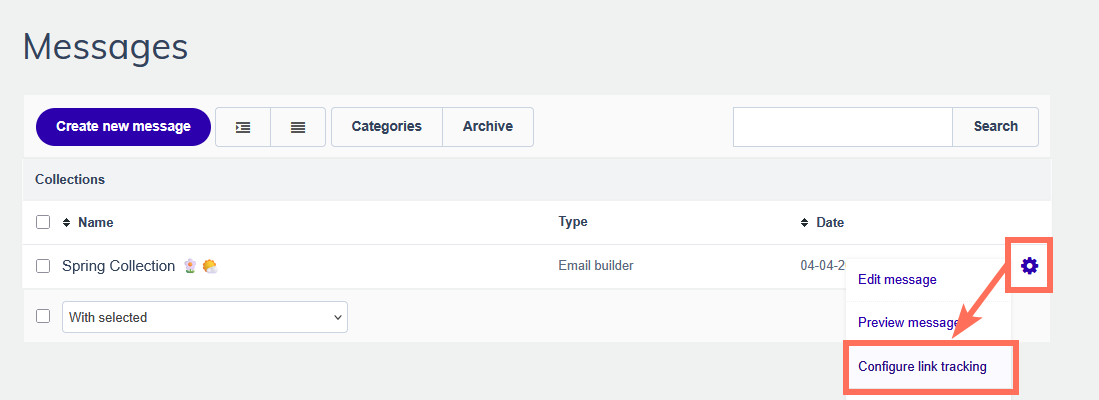
Step 1: Link a URL to an interest
Create your email as usual. Through your message settings, you can assign interests to each link.
Step 2: Click = interest
As soon as someone clicks, the interest is added to that contact profile. Completely in the background — the contact doesn't notice a thing.
Step 3: Use the data
In your contact list, you can now see per contact which interests they have. Use this for segments, dynamic content, or automated flows.
Read our help documentation on exactly how to set up link tracking
Refining interests over time
The beauty of it: interests evolve along with your contacts. Someone who initially only clicks on recruitment content may start clicking on employer branding too. You see interests shift and adjust your content accordingly.Also create specific campaigns to discover interests. A "What's on your organisation's mind?" newsletter featuring different HR themes. Or a "Discover our services" email where contacts can click on what appeals to them.
Tip 1: Structure your welcome email so that it offers different types of content. New contacts receive an introductory email with links to your main content hubs. What do they click on? That's their first interest right there.
Tip 2: Add a small menu at the top or bottom of each email with your main categories. For a pet shop, for example: Dogs - Cats - Birds. These links lead to product categories or blog overviews while simultaneously registering an interest. This way, you also capture valuable behaviour from people who don't click on your main content.
Tip 2: Add a small menu at the top or bottom of each email with your main categories. For a pet shop, for example: Dogs - Cats - Birds. These links lead to product categories or blog overviews while simultaneously registering an interest. This way, you also capture valuable behaviour from people who don't click on your main content.
The difference with standard link tracking
You might be thinking: can't I just see who clicked on which link anyway? That's true. But the difference lies in what you do with it.Standard link tracking:
In your report, you see "Link A: 245 clicks. Link B: 189 clicks." From that report, you can directly send a campaign to everyone who clicked a specific link. That's useful for quick, one-off actions, but it's not efficient for a long-term strategy.
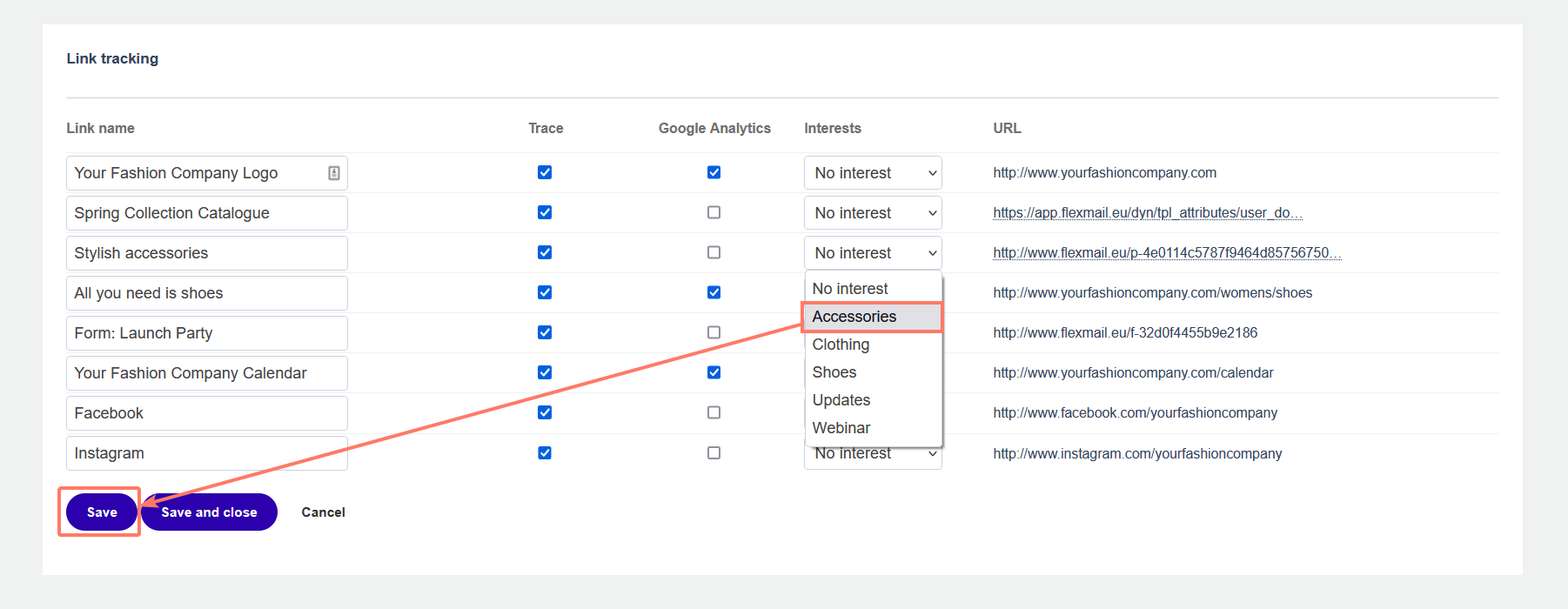
Link tracking with interests:
The system remembers it for you and makes it structurally usable. You instantly create a segment of "everyone with interest X" and use it time and again. Or you leverage those interests for automations and dynamic content. The data becomes actively usable rather than passively informative.
Explore all link tracking possibilities at Flexmail
Common mistakes (and how to avoid them)
Too many interests too quicklyDon't start with 30 different interests. Begin with three to five broad categories and refine later. Too much segmentation makes your campaigns overly complicated.
Not maintaining interests
Interests can change. Someone who clicked on pregnancy articles a year ago may no longer have that interest. Regularly check whether your interests are still up to date.
Not allowing overlap
People can have multiple interests. Someone can be interested in both running and cycling. Don't limit your contacts to a single interest.
Forgetting to tag links
Make link tracking a standard part of your workflow. Check with every campaign whether relevant links have an interest assigned. If you don't do this consistently, you'll miss out on valuable data.
Start small, scale up
You don't have to overhaul your entire email strategy straight away. Start with one campaign. Choose three to five main interests that are relevant to your target audience. Tag the links in your next newsletter with these interests.After a few weeks, check the results. How many contacts now have an interest? Which interests are the most popular? Use that information for a targeted test campaign to one interest group. Does it work? Great, keep going. Doesn't it work as expected? Adjust your interests and try again.
It's all about relevance
Ultimately, email marketing comes down to one thing: send people what they want to receive. The better you know what someone is interested in, the more relevant your content becomes. And the more relevant your content, the better your results.Learn how smart segmentation helps you reduce your unsubscribe rate
Link tracking with automatic interest assignment gives you that knowledge without your contacts having to do a thing. They click on what appeals to them, and you use that information to create better campaigns, display dynamic content, and set up smart automations.
So the next time you create a newsletter, take a look at your links. Which ones tell you something about what people are interested in? Tag them. Collect that data. And make your next campaign even more personal.


