
Flexmail logo
  • Wie es funktioniert
    • Intelligentes E-Mailmarketing
      E-Mails im Handumdrehen
    • Automatische Mailflüsse
      Erstellen Sie personalisierte Szenarien
    • Marketing-CRM
      Persönliche Mails im Massenversand
    • Berichte in Echtzeit
      Datenanreicherung für jeden
    • Interessen
      Versenden Sie fesselnde E-Mails
    • Formulare und Umfragen
      Feedback sammeln
    • Integrationen
      Verbinden Sie sich mit Ihren Lieblings-Tools
    Schneller Überblick über die Flexmail-Plattform
    Gestalten Sie E-Mails auf Ihre Bedürfnisse zugeschnitten und lernen Sie aus den richtigen Ergebnissen
    Arrow icon
    Wie es funktioniert
    • Intelligentes E-Mailmarketing
    • Automatische Mailflüsse
    • Marketing-CRM
    • Berichte in Echtzeit
    • Interessen
    • Formulare und Umfragen
    • Integrationen
    • Transaktionale E-Mail
  • Transaktional
  • Preis
  • Resources
    Integrations
    Downloads
    Vorlagen und Downloads, die Ihre E-Mails verbessern
    • Blog
    • Webinare
    • Fälle
    • Support erhalten
    Resources
    • Masterclass
    • Downloads
    • Blog
    • Webinare
    • Fälle
    • Support erhalten
  • Partner
EinloggenProbieren Sie es kostenlos aus

January release notes: Your new command center for email performance

Michelle Michelle Dassen
12-02-2026 • 
6 Minuten Lesezeit
Share via EmailShare on FacebookShare on X
January release notes: Your new command center for email performance
    We've been listening to you. And we heard the same thing over and over: compiling campaign performance data takes way too long. Clicking through dozens of individual reports, manually building spreadsheets, wrestling with API exports just to answer simple questions like "How did my newsletters perform last quarter?" or "Which campaigns got the best engagement this year?"

    Today, that changes. Meet the new campaign reports dashboard – your new one-stop view for all your email marketing performance.

    Quick overview:

    1. Finally, all your campaign data in one place
    2. Why you'll love the campaign reports dashboard
    3. What's coming next?
    4. Getting started
    5. Real talk about what's different
    6. Pro tips for power users

    Finally, all your campaign data in one place

    Think of this as your email marketing control tower. Instead of visiting each campaign report individually, you now get a bird's-eye view of everything you've sent, with the power to drill down exactly how you want.

    Here's what makes it special:

    Smart filtering that actually makes sense
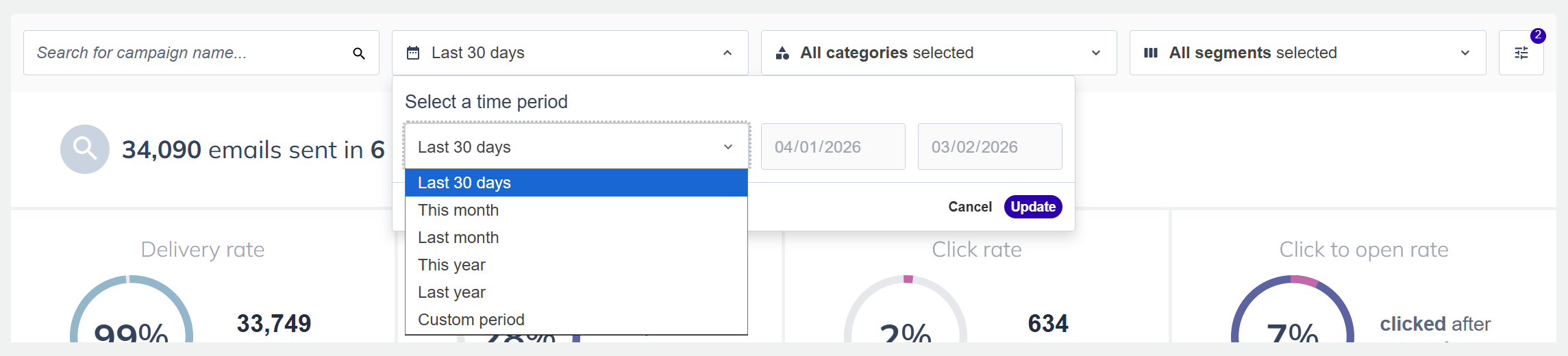
    Campaign time period


    Filter your campaigns by:

    • Timeframe: Last 30 days, this month, last quarter, this year, or pick any custom date range
    • Categories: See performance by newsletter, promotion, announcement or language, – however you currently organize your campaigns
    • Campaign types: Compare regular campaigns vs. A/B tests
    • Audience segments: Analyze how different audiences respond to your messaging
    Mix and match these filters to answer questions like "How did my promotional campaigns to VIP customers perform in Q3?" All your data updates in real-time as you adjust the filters.

    Pro tip: If you haven’t used campaign categories before, you can still create them and move existing campaigns to those categories using the multi-select on your campaign overview.


    Seven essential KPIs at a glance
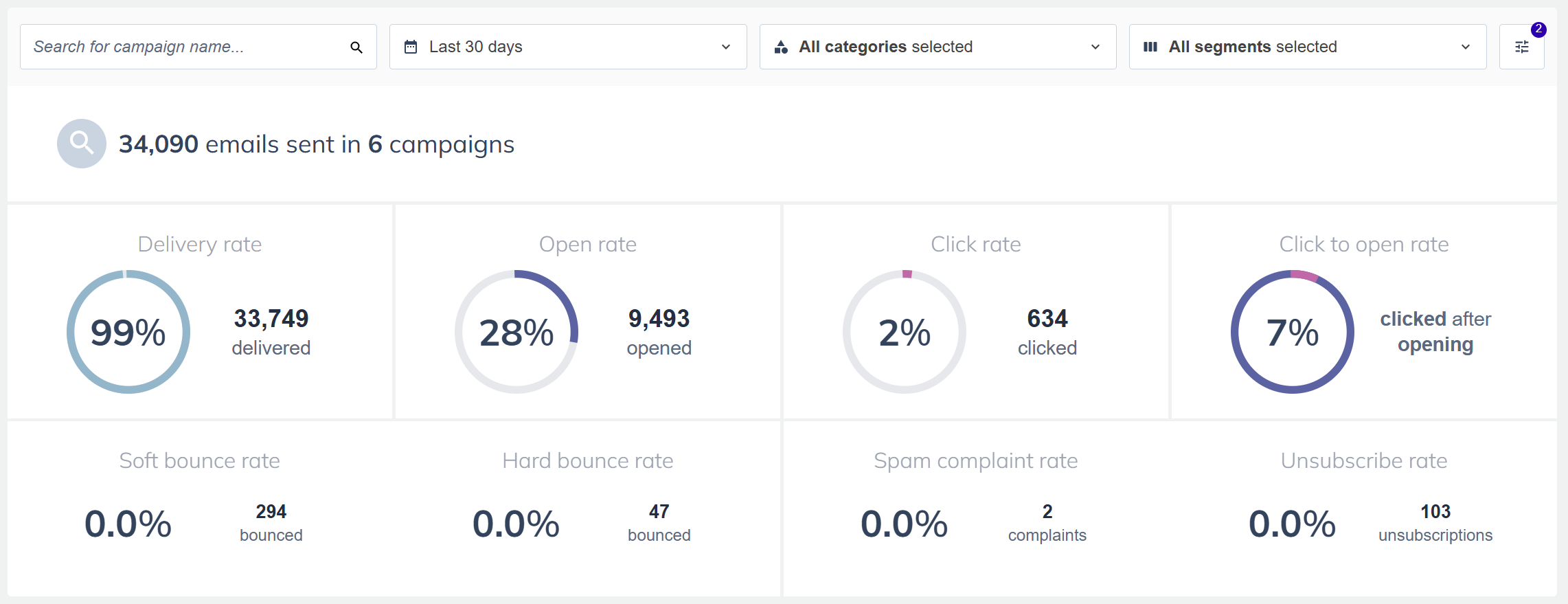
    Campaign Report


    The dashboard highlights the metrics that matter most:

    • Delivery rate
    • Open rate
    • Click rate
    • Click-to-open rate
    • Bounce rates (soft and hard)
    • Spam complaint rate
    • Unsubscribe rate
    Each metric shows you percentages, the actual numbers, and helpful context. Plus, we've added smart warnings that light up when something needs your attention – like bounce rates above 10% or unsubscribe rates over 1.5%.

    A performance table that works like you think

    See all your campaigns in one organized table with every metric you need. Sort by any column to find your best performers or identify campaigns that need attention. Click any campaign name to jump straight to its detailed report.

    We've also added visual indicators that flag potential issues, so you can spot problems before they become bigger problems.

    Why you'll love the campaign reports dashboard

    For busy marketers: Stop spending hours compiling data. Get your monthly performance report done in minutes, not an entire afternoon.

    For data-driven teams: Make better decisions faster. See patterns across campaigns, identify what's working, and double down on strategies that drive results.

    For agency teams: Build client reports effortlessly. Filter by client segments, export comprehensive data, and show your results with confidence.

    For everyone: Finally, a simple answer to "How are our emails performing?" without needing a computer science degree or three hours of free time.

    What's coming next?

    This is just the beginning. We're rolling out this dashboard in phases, and here's a preview on what's on the roadmap:

    • Period comparisons: Compare this month to last month, or this quarter to last year, right in the dashboard
    • Saved views: Save your favorite filter combinations for instant access
    We're launching with the essentials that solve your biggest pain points right now, and we'll keep adding more power as we go. Have any feedback to share? We’re looking forward to your first experiences.

    Getting started

    Ready to reclaim those hours you've been spending on campaign analysis?

    1. Log in to your Flexmail account
    2. Navigate to Campaigns > Campaign reports
    3. Pick your timeframe (we default to the last 30 days to get you started)
    4. Apply filters to slice your data however you need
    The dashboard shows all your sent campaigns (we automatically exclude drafts, scheduled messages, test campaigns, and archived campaigns to keep your data clean and relevant).

    Real talk about what's different

    If you've been using our SOAP API for custom exports or manually pulling data from individual reports, this dashboard replaces that entire workflow. It's faster, easier, and gives you everything you need without the technical gymnastics.

    And unlike individual campaign reports (which are still there when you need that granular detail like click maps and device breakdowns), the dashboard gives you the big picture. It's the "forest" view to complement the individual reports' "trees."

    Pro tips for power users

    • Monthly reporting routine: Set your timeframe to "last month," apply your category filters, hit export. You're done.
    • Trend spotting: Sort by different metrics to see which campaign types consistently perform best
    • Audience insights: Filter by different segments to understand which audiences engage most with your content
    • Health checks: Keep an eye on those warning indicators – they're your early warning system for deliverability issues
    Questions about the new dashboard? Our support team is here to help you get the most out of your data.

    Verwandte Artikel

    December 2025 release notes: Share your email templates with anyone
    RELEASE NOTES
    08-01-2026
    December 2025 release notes: Share your email templates with anyone
    5 Minuten Lesezeit
    Flexmail's September updates: Advanced text editor + dynamic content
    RELEASE NOTES
    07-10-2025
    September 2025 release notes: Text formatting freedom + smart dynamic content
    7 Minuten Lesezeit
    Flexmail's summer updates: templates & smarter social media
    RELEASE NOTES
    24-09-2025
    July & August 2025 release notes: Template library and enhanced social connections
    5 Minuten Lesezeit

    Fehlende E-Mail-Tipps?
    Nicht mit Flexmail.

    E-Mails, die Sie zu einem besseren E-Mail-Vermarkter machen*.
    Melden Sie sich an und erhalten Sie unsere besten Inhalte in Ihrer Mailbox.

    *Basierend auf unwissenschaftlicher, aber sehr genauer Forschung
    Flexmail logo
    Ihr E-Mail-Marketing Guide
    • NL
    • EN
    • FR
    • DE
    Plattform
    • E-Mail-Marketing
    • Drag & Drop builder
    • Automatisierung
    • Integrationen
    • Preis
    • Flexmail versus Mailchimp
    • Flexmail versus MailerLite
    • Unser Produkt
    Flexmail
    • Über uns
    • Partner
    • Datenschutzerklärung
    • Anti-Spam-Richtlinie
    • Allgemeine Geschäftsbedingungen
    • Cookie-Erklärung
    • Akzeptable Nutzungsrichtlinie
    • Data processing Agreement
    • Generative KI Richtlinie
    Lernen
    • Blog
    Hilfe bekommen
    • KontaKt
    • FAQ
    • Schulung
    • Hilfedokumentation
    • Für Entwickler
    • Status
    FacebookLinkedInXInstagramYouTubePinterest
    Copyright @2026 Flexmail nv
    Alle angegebenen Preise verstehen sich zuzüglich der gesetzlichen Mehrwertsteuer.
    ISO-27001 logo
    ISO-27701 logo
    IaBelgium logo
    Feweb logo
    MwSt BE0835 786 642
    Jaarbeurslaan 29 bus 31, 3600 Genk